

How AI Outfitter fits together
Synced from
outfitter/docs/documentation/ai-outfitter.md. The repository is the source of truth.
Open, vendor-neutral tooling for configuring and operating agents: ramp a user, a team, or an organization from AI-assisted coding to an autonomous software development lifecycle.
Everything here builds on one convention: an agent’s context, tools, skills,
and permissions are plain files in a .agents/ directory — committed,
reviewed, and shared like the rest of your code. The same plain-file definition
can be shared across environments and model vendors; runtime support varies by
harness, as shown in the
support matrix.
The core is open source under MIT.
Why we built AI Outfitter
Section titled “Why we built AI Outfitter”We built AI Outfitter to give teams a shared path from local agent use to automated and governed workflows. Its defaults are customizable, so teams can begin at the rung that matches their current process.
The adoption ramp
Section titled “The adoption ramp”Five rungs, from AI-assisted coding to an autonomous lifecycle (full definition). Each Outfitter component targets a rung, so you climb without rebuilding what got you here — and without adopting complexity too early. Rungs 2, 3, and 4 each open with the runbook that gets you there: the concrete steps, and a success check you run rather than judge.
-
Assisted — autocomplete and chat; a human’s hands stay on the keyboard. You are here if you use autocomplete in an IDE. There is nothing to govern yet — but the habit that matters starts here: document what works and what doesn’t in
AGENTS.md/CLAUDE.md, and keep it in the repo.- First-time CLI agent users
— what belongs in a first
AGENTS.md, and how to ask an agent to use it.
- First-time CLI agent users
— what belongs in a first
-
Delegated — a local agent does the task; you define the idea and review the PR. You are here if engineers run a coding agent in a terminal and push the result. This is where configuration starts to matter.
- Runbook: Share one catalog — one pinned catalog the organization shares, instead of per-laptop configuration.
- outfitter — composes what
an agent knows and may do into a profile: plain files in your
.agents/folder, reviewed like code and portable across environments and harnesses (the CLI that runs an agent: Claude Code, Pi, Codex). - deepwork — step-by-step quality gates so the agent checks its own work.
-
Automated — a workflow runs without your laptop: an issue, a message, or a schedule triggers agents in CI, on a cluster, or on a remote server you never sit at; adversarial review is part of the pipeline; session logs are captured before merge. You are here when you close your laptop and the work keeps going. What promotes you is the trigger, not the hardware: an agent you drive over SSH is rung 2 on a bigger machine.
- Runbook: Run it without your laptop — an event triggers the workflow, its output lands through review, and the session is captured.
- actions — runs any profile headless in GitHub Actions, on any trigger.
- channels — pushes email, Slack, Signal, and forge events (GitHub or GitLab activity) into an agent session, so one message can start the same workflow.
- agent-operator — hosts the same profiles on your own infrastructure, well before you need its resident-agent story on the next rung.
-
Governed — the organization shares one version-pinned catalog of agents, skills, and policy; every agent action lands in an auditable record; resident agents — long-lived agents onboarded like teammates, with their own accounts and boundaries — take on standing jobs. You are here when agents work across many teams, and the organization needs shared policy — and proof of what every agent did.
- Runbook: Give the agent a residence — a named, assignable agent with an account and somewhere to live.
- Build your agent catalog: Share one catalog — the rung 2 runbook creates it and links to guidance on its layout, version pinning, and governance. Our own .agents is a worked example you can read end to end.
- agent-operator — provisions and supervises resident agents on your own infrastructure.
- pensieve — designed to retain evidence from agent sessions, including environments, agents, tools, artifacts, and costs. That record can support audits, compliance reviews, and evaluation workflows.
-
Self-improving — the audit record feeds evals and improvement; humans set goals and acceptance gates, agents own the middle. Rung 5 is where the stack is thinnest today.
- evals — evaluates changes to a profile, model, or workflow with reproducible, attested benchmarks.
- autoimprove — improves portable skills against measured outcomes.
Start with one workflow end to end
Section titled “Start with one workflow end to end”One useful first workflow takes a feature idea to a merged PR, automated end to end, with every step leaving evidence. This is what rung 3 looks like up close.
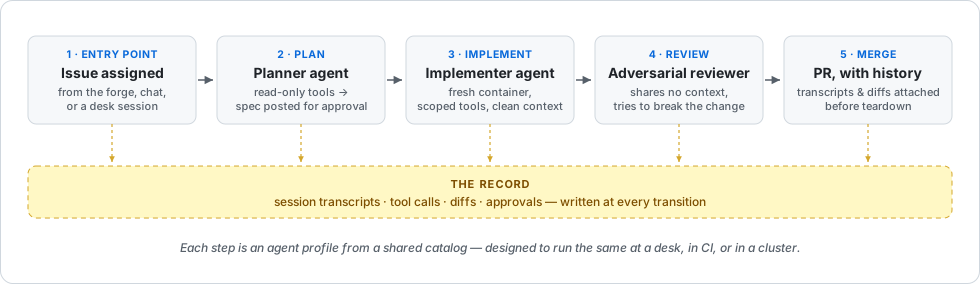
- Entry point. Someone files an issue and assigns it to an agent — from the forge, from chat, or from a planning session at a desk. Different doors, same workflow.
- Plan. A planner profile with read-only tools turns the issue into a spec artifact and posts it back to the issue, where a human can approve it (we recommend an enforced spec system, like 2119, for more autonomous workflows).
- Implement. An implementer profile picks up the approved spec in a fresh container with exactly the tools the work needs — a different agent, a clean context window, the same shared catalog.
- Review. An adversarial reviewer profile, which shares none of the implementer’s context, tries to break the change before any human reads it.
- Merge. The PR arrives with its history attached: session transcripts, tool calls, and diffs captured as artifacts before the environment that produced them is torn down.
The same shape handles other starting workflows. A vulnerability report instead of a feature idea turns the pipeline into governed security remediation: the scanner files the issue (most scanners already can), the planner scopes the fix, and the same steps carry it to a tested, approved PR. Bug reports run the same way with a triage step in front: an agent reproduces and prioritizes each report, and only the ones that clear triage enter the pipeline.
Teams adopt the system through the same composition process: an engineer
refines a skill in their own
~/.agents
against real work; the team mines
pensieve for the patterns behind
successful and failing runs. When a change earns trust it moves by pull
request into the org catalog, where every agent composes it by name. One
person’s improvement becomes everyone’s default at the next pin bump — no
one else reconfigures anything.
Start this afternoon
Section titled “Start this afternoon”You can begin with a local assessment and CLI trial before committing to an organization-wide rollout or additional infrastructure.
1. See where you are
Section titled “1. See where you are”The read-only assessment takes one afternoon. The
org-onboarding runbook
produces a baseline SDLC report: where your organization sits on the
ramp, with evidence, gaps, and next-rung recommendations. Concretely: one
engineer runs the sdlc-report skill from their own local agent with a
read-only forge token. It reads through the API — never clones, never
writes — and produces two local files you review before anyone else sees
them. We ran it on this organization the day we wrote this page; the output
is committed at
.agents/reports/sdlc,
so you can see exactly what you would get.
2. Try the toolchain
Section titled “2. Try the toolchain”The first run takes about ten minutes.
npx @ai-outfitter/outfitterThis launches the Outfitter CLI with the
Pi harness bundled and walks you
through composing your first agent profile from a starter catalog. You end
in a working agent session, and everything it created is plain files under
~/.agents — which you can read, edit, or delete afterward.
3. Automate one workflow
Section titled “3. Automate one workflow”Pick feature-to-PR or bug-to-PR, keep it to one repository, and promote the profiles you already trust at a desk into CI. Work the runbooks in order — share one catalog, run it without your laptop, then give the agent a residence. Each ends with the one concrete step that starts the next.
Every runbook closes with a Done when section naming the signals the report
above checks — for this one, triggered-agents, protected-landing, and
session-capture. Re-run the report and it names whichever is still unmet.
Agent configuration as code
Section titled “Agent configuration as code”Your agent setup is already configuration: system prompts, skills, MCP servers, model choices, permissions. Today that configuration lives per tool and per laptop, gets pasted between repositories, and drifts. Every other kind of configuration your organization depends on graduated from that stage years ago — into files, in a repository, behind review.
The .agents convention
is an open standard for doing the same for agents:
.agents/ agents.md # shared operating context system-prompt.md # base system prompt mcp.json # MCP servers models.json # model configuration agents/<id>/agent.md # agent identities + loadouts skills/<id>/... # capability packages knowledge/ # reference documents commands/ # slash commandsBecause the configuration is Markdown and JSON, you can read, review, and
audit it with ordinary repository tools. Layers merge by name — a project’s
.agents/ over an engineer’s ~/.agents/ over the organization’s
catalog,
a shared collection pinned by version — so individuals keep their preferences and
organizations keep their policy
(conventions).
Composition beats accumulation. A profile is a selection from those files, and profiles stack: a personal baseline, a team convention, a project role, switched as the work changes. That keeps each profile tight, and tight profiles preserve the context headroom that turns into faster, better sessions.
The directory is also the exit door. It is the source of truth, and it is useful without Outfitter. Vendor-neutral cuts in every direction — models, harnesses, and us. Swap model vendors freely. Run the catalog through any harness: Pi has the deepest runtime support today, with Claude Code tracked component by component in the support matrix — a Claude Code team starts on Claude Code, and the matrix shows the gaps before you hit them. And if you drop Outfitter itself, the catalog you built is still yours — plain files, still working.
Where this is today
Section titled “Where this is today”Outfitter and several supporting projects are in active development. Actions and the catalogs run AI Outfitter’s own workloads today; rung 5 remains the least developed part of the stack. Check each linked repository for its current implementation status.
The model is open core: the convention, the toolchain, and the defaults are MIT — modules you can rip out and replace — while some advanced capabilities ship under an enterprise license. If you are evaluating this for an organization, open an issue with what you found. The gaps you hit are the roadmap we want.
As you climb
Section titled “As you climb”Two suggestions we make strongly, and follow ourselves:
- Automate nothing you have not first done manually.
- Hand over control one layer at a time.
You never skip a step you don’t understand, and nothing you build on one rung is thrown away on the next.